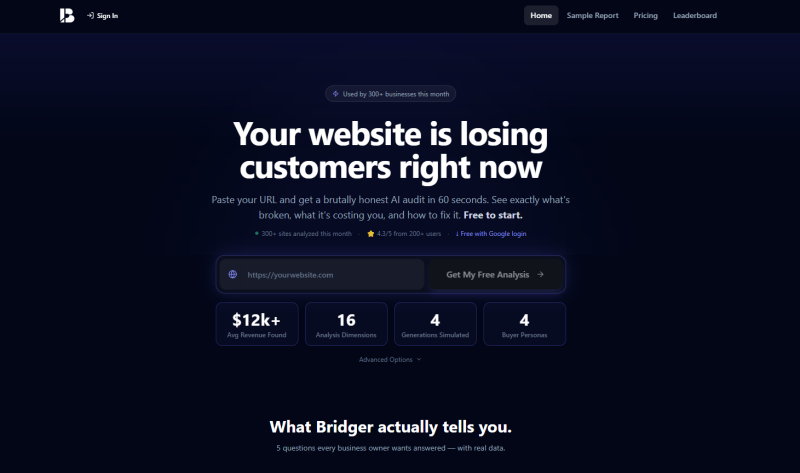
Most website owners check their traffic numbers, nod approvingly, and move on. Google Analytics tells you how many people showed up. It says almost nothing about why they left without buying, or what that exit is actually costing you in dollars every single month. That gap is exactly where Bridger steps in, and it does so in about 60 seconds flat.
Bridger is an AI-powered website audit tool that scores your site across 16 dimensions, from design and messaging to trust signals, SEO, performance, and conversion readiness. Paste your URL, sign in with Google, and within a minute you get a report that includes a real dollar estimate of the revenue you’re losing right now. No agency retainer. No waiting days for a PDF that says “consider improving your CTAs.”
Over 300 businesses have run their sites through it this month, and the average report surfaces around $12,000 per month in missed revenue. That number is calculated using your actual traffic data combined with industry conversion benchmarks, so it’s grounded in something real rather than plucked from thin air.
What Bridger Actually Scores Across Those 16 Dimensions
Generational Audience Simulation
This is the feature that genuinely surprised me. Bridger doesn’t treat your visitors as one homogeneous blob. It simulates how four distinct generations, Gen Z, Millennials, Gen X, and Boomers, each experience your site and scores them separately. A site can score 8.5 with Millennials and only 3.2 with Boomers. If your product serves a broad age range, that gap is a serious problem you’d never spot in your analytics dashboard.
Revenue Loss Estimator
Most audits tell you what’s broken. Bridger attaches a dollar figure to the damage. It takes your estimated monthly visitors, your current implied conversion rate, your industry’s average order value, and calculates what a modest improvement would recover each month. Seeing “you’re losing approximately $4,200 per month because your mobile load time is 5.1 seconds” hits differently than a generic speed warning.
Prioritized Action Plan
Every report closes with a three-tier action roadmap: Quick Wins for weeks one and two, Core Improvements for month one, and Growth Plays for months two and three. Each item is flagged as high or medium priority. You’re never left staring at a wall of suggestions wondering where to even begin.
Performance and ADA Compliance Audit
Bridger pulls real Google PageSpeed data and flags mobile load issues directly inside the report. It also includes an accessibility audit, something most standalone tools charge separately for. If your mobile load time clears three seconds, the report flags it bluntly as a visitor retention problem.
Buyer Persona Profiles
The tool generates four AI-built buyer personas tailored to your specific industry. These aren’t generic marketing archetypes. They reflect how different customer types would interpret your messaging, where they’d drop off in the conversion path, and what trust signals they’d look for before committing.
Marcus Runs His Client’s Site Through Bridger at 9 PM on a Tuesday
Marcus is a freelance web designer based in Austin. At 9 PM on a Tuesday, he was wrapping up a redesign proposal for a local home services client and wanted something concrete to include that would justify a full overhaul of the existing site. He pasted the client’s URL into Bridger, logged in with Google, and had a full report in under two minutes.
The report showed an overall score of 5.8 out of 10. The conversion section sat at 4.1. More usefully, the revenue estimator calculated that the site, pulling around 8,000 visitors per month with a below-average conversion rate, was leaving roughly $3,400 per month on the table. The generational breakdown showed the site was reasonably legible to Gen X customers but nearly unusable from a trust and clarity standpoint for Millennials, who made up the client’s biggest referral segment.
Marcus screenshot the action plan, dropped it into his proposal doc, and sent it over that same night. The client approved the project the next morning. Marcus didn’t have to write a single word of the audit himself.
How a Bridger Report Actually Gets Generated
Step 1: Paste Your URL
Go to the homepage, drop your website address into the input field, and sign in with Google. No credit card needed for the free tier.
Step 2: Bridger Crawls and Scores
The tool pulls live performance data, crawls your page structure and copy, runs the generational simulations, and scores all 16 dimensions simultaneously. The whole process runs in about 60 seconds.
Step 3: Read the Report
Your report lands on screen with an overall score, a dimension-by-dimension breakdown, the revenue loss estimate with its calculation shown, and the prioritized roadmap. Higher-tier plans unlock competitor comparisons, persona simulations, and a conversion path simulator.
Step 4: Compare and Track
You can submit your site to the public leaderboard to see where you stand globally, and run re-analyses over time to track improvements as you make changes.
Bridger’s Pricing Tiers
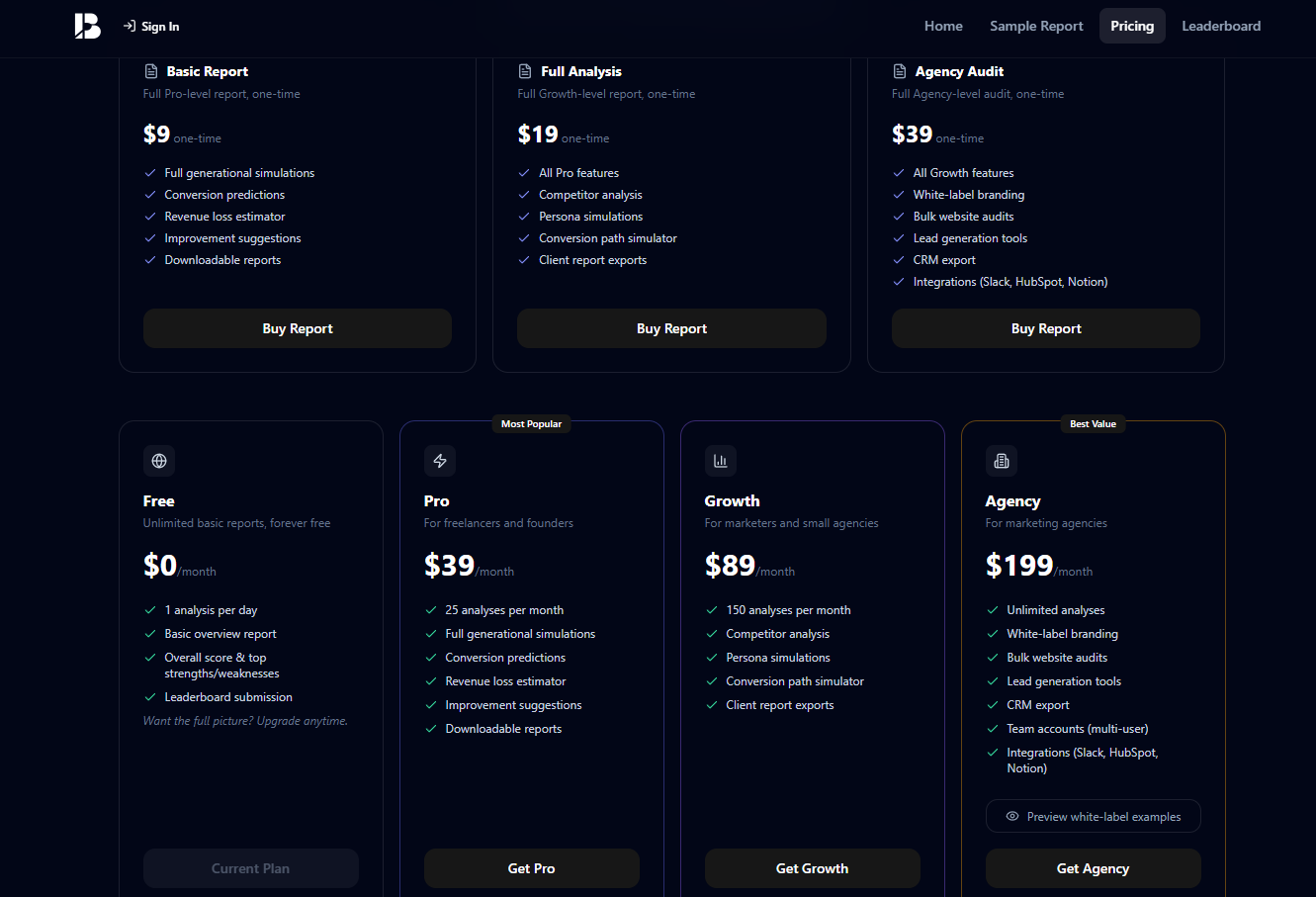
There’s a permanent free plan that lets you run one analysis per day with a basic overview report. One-time reports are also available without a subscription:
- Basic Report: $9 one-time, includes generational simulations and revenue estimator
- Full Analysis: $19 one-time, adds competitor analysis and persona simulations
- Agency Audit: $39 one-time, adds white-label branding and CRM export
Monthly subscriptions start at $39 per month for the Pro plan (25 analyses), $89 per month for Growth (150 analyses), and $199 per month for the Agency plan with unlimited analyses and team accounts.
Who Should Actually Use This
Bridger is genuinely useful for solo founders who want a fast, honest read on their conversion problems without hiring an agency. It’s also a solid client-facing tool for freelance designers and marketers who need structured audit data quickly. The free plan is a legitimate starting point, not a crippled demo. If you want to see what it finds on your own site, start at mybridged.app and have your URL ready.