Most health apps want you to log calories, hit step goals, and stare at sleep graphs. They track what your body does, but they rarely ask how you actually feel. That gap between objective data and subjective experience is exactly where people get stuck, cycling through good days and bad days with no real idea what’s driving the difference.
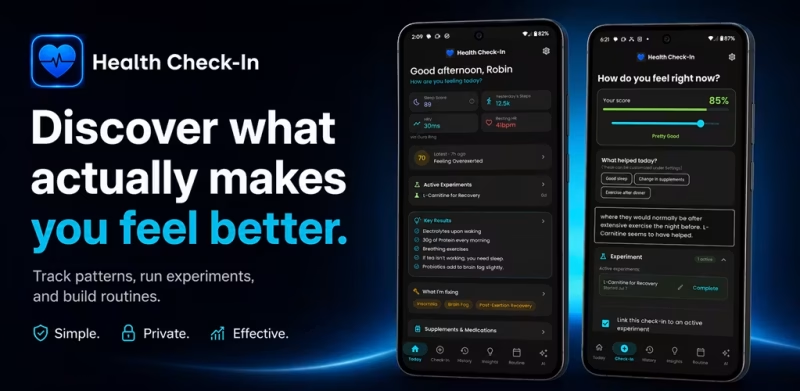
Health Check-In takes a different approach. It starts with one simple question: “How do you feel?” From there, you rate yourself on a 0 to 100 slider, log what you’re trying, run structured experiments, and let AI connect the dots over time. No account required. Your data stays on your device.
It was built by Robin Seaberg, who spent years dealing with fatigue and brain fog before realizing that no app was capturing the subjective piece his doctors kept asking about. He built the tool he wished existed. That origin story matters, because it shows in how the app is designed.
Key Features of Health Check-In
Daily Check-Ins That Take Under 30 Seconds
Slide a score, tap a few tags, add a note if you have something to say. That’s it. The simplicity is deliberate. Consistency matters more than detail, and the app makes it easy to check in multiple times a day without it feeling like a chore. Set a daily reminder and the habit builds itself.
Structured Experiments to Test One Thing at a Time
This is the feature that separates Health Check-In from a basic journal. Pick a problem you want to address, whether that’s insomnia, brain fog, fatigue, or joint pain, then set up an experiment around a specific change. Cut out sugar. Try magnesium before bed. Add a daily walk. The app tracks your check-in scores before and after, with follow-up reminders at 7, 14, 21, or 30 days. When the experiment concludes, you record what you learned and can save successful findings as Key Results.
AI Pattern Analysis Across All Your Data
After a couple of weeks of consistent logging, the AI can read across your check-ins, sleep data, supplement logs, weather, and activity records to surface correlations you might never notice on your own. You can ask follow-up questions and have multi-turn conversations with it. It doesn’t replace medical advice, but it can flag things worth paying attention to.
Build and modify your Daily Routine
As Health Check-In helps you to learn more about what works for you and what doesn’t, you can plan your activities or when to take supplements around customizable “blocks” of time into a daily routine. You can have as many routines as you want – A standard one, one for a recovery day, etc. Once you have been logging for a couple weeks, the AI can even build a routine which is based off of everything you’ve entered. Reminders can also be enabled here to help keep you engaged.
Wearable and Health App Integrations
Connect Apple Health, Oura Ring, Fitbit, or Google Health Connect and your sleep scores, HRV, resting heart rate, and step counts appear automatically alongside your check-ins. Seeing how you felt on a day when your HRV was low versus high starts to tell a real story over time.
Privacy-First by Design
No account, no ads, no cloud sync unless you choose it. Your health journal lives on your device. For anyone tracking symptoms, medications, or mental health patterns, that’s not a minor detail. It’s the whole point.

One Week in Marcus’s Life With Health Check-In
Marcus, a 38-year-old software developer, had been dealing with persistent afternoon energy crashes for about six months. He assumed it was stress. His Oura Ring consistently showed solid sleep scores, which made the crashes more confusing, not less.
On a Monday morning at 7:45 AM, he set up an experiment in Health Check-In around his lunch habits. He’d been eating a large carb-heavy meal around noon every day, and he wanted to test whether switching to a protein-focused lunch would change how he felt by 3 PM. He started checking in twice daily: once at 8 AM and once at 3 PM, rating his energy and focus on the slider and adding short notes.
By day ten, the trend was visible without any AI needed. His 3 PM scores jumped from an average of around 55 to consistently sitting above 75 on days he’d eaten differently. He asked the AI to analyze the pattern across his full check-in history, and it confirmed the correlation while also flagging that his lower-energy days clustered around nights with below-average sleep duration, even when his sleep score looked fine.
He saved both findings as Key Results and built them into his daily routine inside the app. The guesswork was gone. He had actual data pointing to two specific, fixable things.
How Health Check-In Actually Works
Step 1: Name What You’re Trying to Fix
Before tracking anything, you define the problem. Brain fog, poor sleep, fatigue, digestive issues — the app asks you to be specific. This keeps your experiments focused rather than scattered.
Step 2: Start an Experiment
Browse ready-made templates or create your own. Set a follow-up reminder at your preferred interval. The app ties your daily check-ins to the active experiment so scores are captured in context.
Step 3: Check In Daily
Rate how you feel, tag contributing factors, add a note. Takes about 30 seconds. Reminders keep you consistent.
Step 4: Review Trends and Ask the AI
The Trends screen visualizes your scores alongside sleep and step data over days, weeks, or months. When you have enough data, the AI tab lets you ask open questions and get pattern-based answers drawn from your own history.
Step 5: Save What Works
Successful experiments become Key Results. Those Key Results feed into a structured daily routine with time-blocked reminders for supplements, habits, and medications.

Who Should Try Health Check-In
If you’ve ever sat across from a doctor and given a vague answer to “How have you been feeling?” because you genuinely didn’t know, this app is worth trying. It’s particularly useful for people managing chronic fatigue, brain fog, sleep issues, or supplement stacks where results are hard to isolate. The free version is available now, with no account required to get started. Head to healthcheckin.app to download it for Android or iOS, and check out the Product Hunt launch page for early community feedback and demo videos.