Manual space planning is one of those corporate headaches that nobody talks about publicly, but every workplace manager dreads. Spreadsheets, email chains, floor plan printouts covered in sticky notes, and then a restructure lands and you start all over again. It can take weeks. Sometimes months. And the result is still imperfect.
Spaiceman is an automated AI space manager built to replace that entire process. Upload your floorplans, connect your employee data, write a few plain-English AI rules, and the AI assigns every person to the right desk or neighbourhood, across every floor, in under 60 seconds. It also monitors your enterprise systems and rebalances the office whenever something changes.
The product comes from David Mutch, a Sydney-based workplace strategist who spent years managing the space allocation of over 30,000 employees across 41 offices, largely without software. That background shows. Spaiceman is not a generic scheduling tool with a fresh coat of paint; it is purpose-built for the specific, stubborn complexity of corporate space management.
Key Features of Spaiceman
AI Optimisation Engine (Floor Stacking)
The core of the product is what Spaiceman calls its optimisation engine. It analyses your employee data, attendance patterns, and team structures, then creates right-sized neighbourhoods across every floor with no wasted desks and no overflow. You can schedule it to run daily or trigger it manually after a workforce change. The AI rebalances every floor across every building simultaneously, a task that would take a human team days to complete.
Plain-English Rules Engine
This is where things get genuinely interesting. Instead of navigating configuration screens and dropdown menus, you just describe your seating requirements the way you would explain them to a colleague. Something like: “Interns and their mentors should sit next to each other” or “Only the M&A team can enter the confidential project zone.” The AI interprets your intent and applies the rule across the entire floor, building, or portfolio. Six rule categories cover the full range of workplace scenarios: adjacency, capacity, exceptions, preferences, proximity, and scheduling.
Real-Time Enterprise Monitoring
Spaiceman watches your connected enterprise systems, including HR platforms like Workday, and automatically triggers a restack whenever employee data changes. Someone joins, someone leaves, a team restructures. The office layout updates to reflect it. No one needs to log in and manually push changes through.
Employee Portal and Downstream Notifications
Once the AI has assigned seats or neighbourhoods, it notifies each employee directly through a built-in portal. It can also communicate changes to downstream systems like desk booking, badge access, and wayfinding platforms. The whole chain, from data change to updated seating plan to employee notification, runs without manual intervention.
A Monday Morning That Used to Take Six Weeks
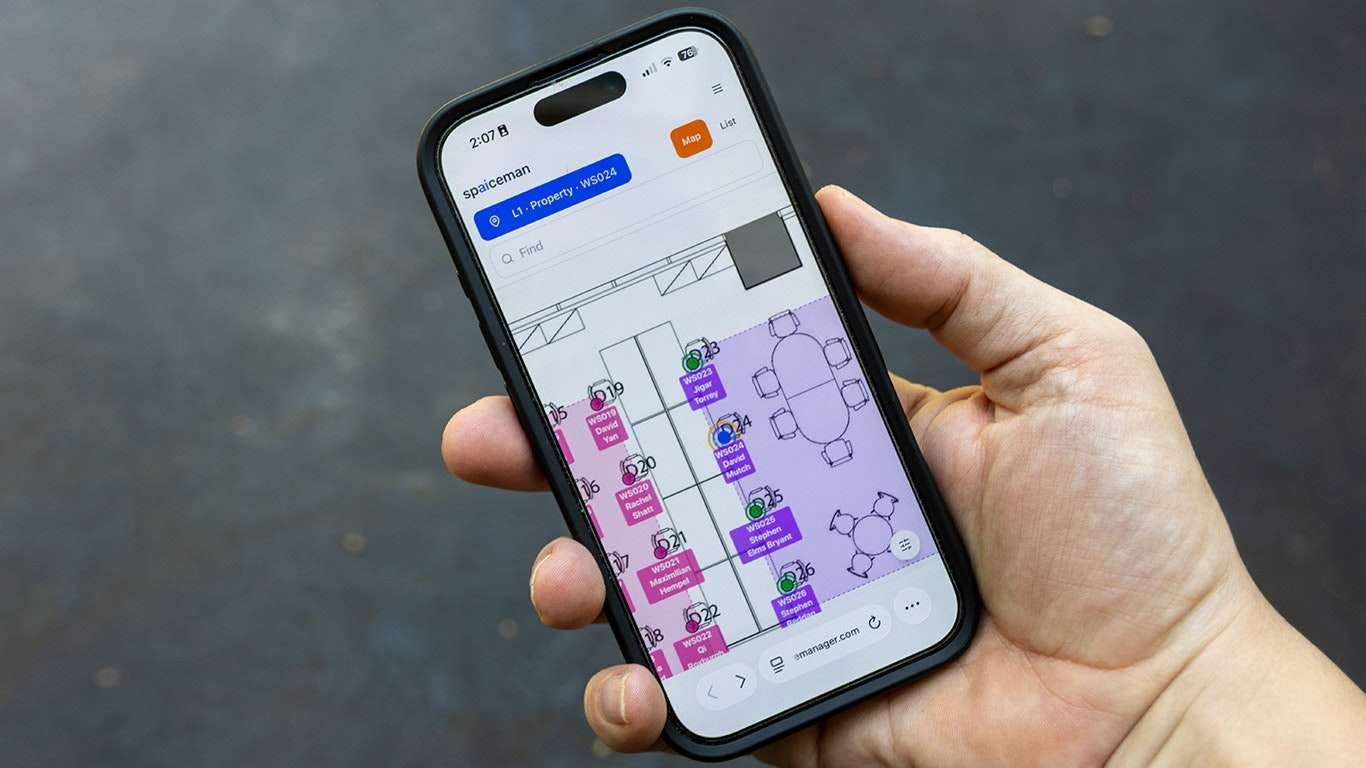
Consider Sarah Chen, Head of Workplace Experience at a 400-person financial services firm in Melbourne. It is 8:45am on a Monday. Overnight, the HR system flagged a significant change: a 35-person acquisitions team has been brought on board and needs to be integrated into the existing HQ layout by the time they arrive on Wednesday.
Before Spaiceman, that scenario would have triggered a frantic scramble. Sarah would have opened the master spreadsheet, cross-referenced the floor plan, started manually shifting neighbourhoods, discovered three conflicts with existing teams, sent fourteen emails, and probably still been sorting it out on Wednesday afternoon. A similar floor-stacking exercise delayed one of David’s major office projects by six weeks, then another eight. The cost to operations was enormous.
With Spaiceman, Sarah logs in at 8:47am. The system has already detected the HR data update. She reviews the AI’s proposed restack, which places the new acquisitions team adjacent to their key stakeholders per the proximity rule she set up months ago, checks for conflicts (there are none), and approves it. By 9:02am, every affected employee has received their updated seating assignment via the portal. Sarah moves on to her actual work for the day.
That is the concrete outcome: what used to take a team of people days or weeks now takes one person less than twenty minutes, including the coffee break in between.
How Spaiceman Stacks Your Floors
Step 1: Upload Your Floorplans and Employee Data
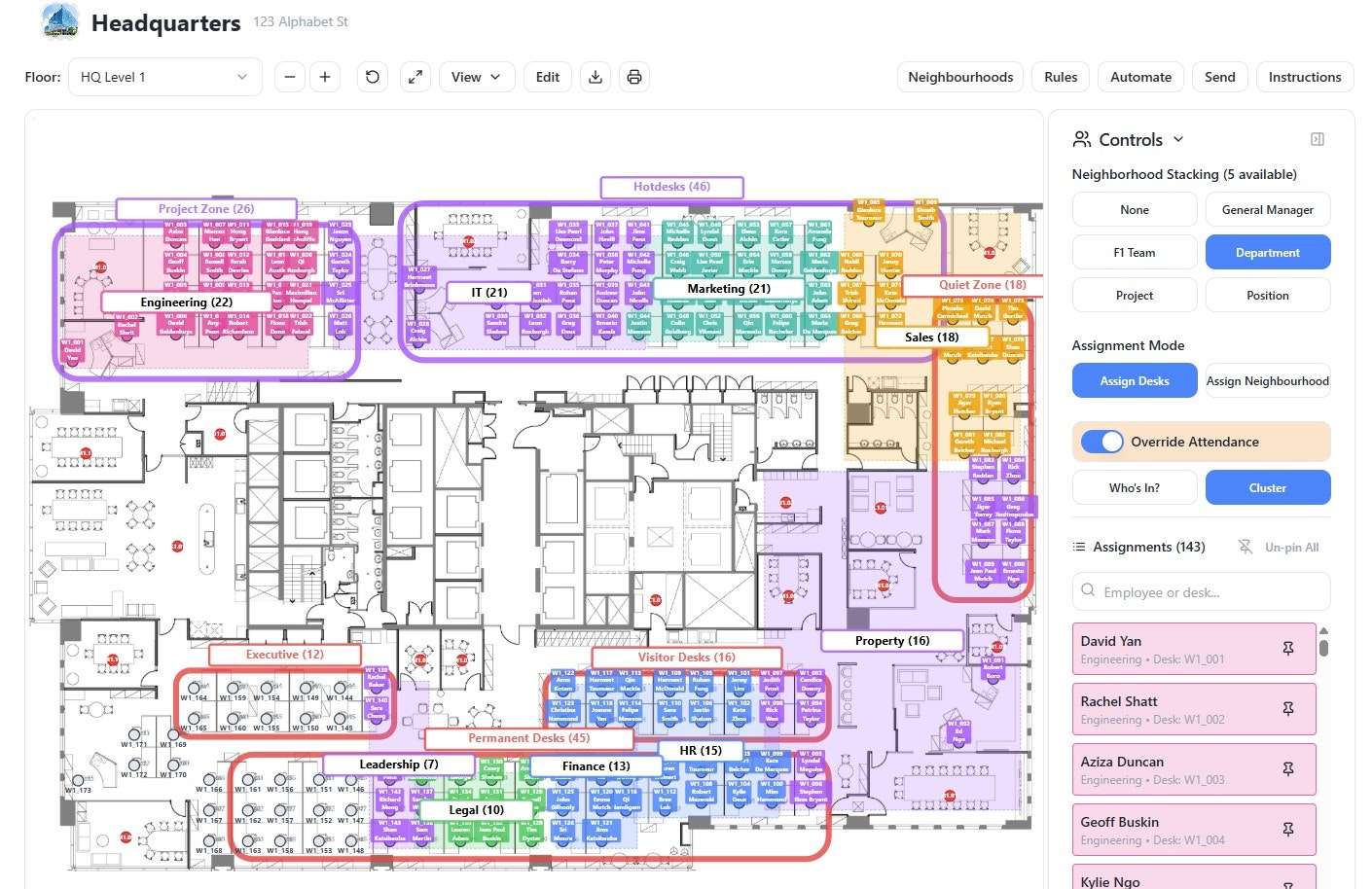
You start by adding your buildings and uploading digital floorplans. Then you connect your employee data, either by uploading a file or linking directly to an enterprise HR system. Spaiceman pulls in names, departments, attendance patterns, team structures, and any other fields relevant to your grouping logic.
Step 2: Define Your Neighbourhoods and Rules
Next, you configure how you want the AI to group people. You select neighbourhood groupings (by department, project, position, general manager, and so on) and then write your rules in plain English. The AI learns your language over time, so each new rule becomes faster to create.
Step 3: Run the Optimisation and Send Assignments
Trigger the stacking manually or put it on a schedule. The AI resolves any rule conflicts, assigns every employee to the right place, and sends notifications through the employee portal. From that point, the system monitors your connected enterprise platforms and restacks automatically whenever the data changes.

Pricing
Spaiceman offers a free 4-week trial with no payment method required, which is a generous way to evaluate a product at this level of complexity. Paid plans run on monthly or annual recurring billing, and new paid subscribers are covered by a 14-day satisfaction guarantee with a full refund available if the platform does not meet expectations. Specific tier pricing is listed on the Spaiceman pricing page.
Who Should Try Spaiceman
If you manage space for more than 100 people across one or more offices, this is worth a serious look. It is particularly well-suited to hybrid workplaces, activity-based working environments, and any organisation going through growth or restructuring. The free trial removes the usual barrier to entry. Start at aispacemanager.com and see how long a restack actually takes when the AI is doing the heavy lifting.