Most productivity tools promise to fix your workflow. What they actually do is add another tab to your already crowded browser. You end up with tasks in one app, team communication in another, meeting notes somewhere else, and reports buried in a spreadsheet nobody updated last week. The context keeps splitting, and the work keeps stalling.
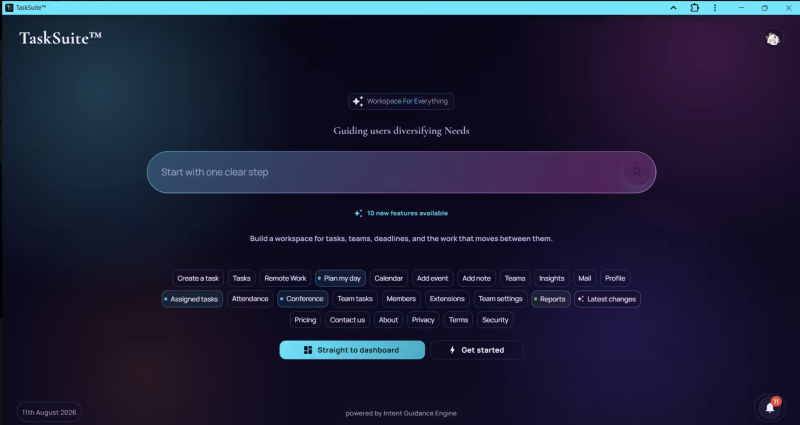
TaskSuite takes a different approach. It calls itself an “intent-first” workspace, which sounds like marketing speak until you actually use it. The idea is simple: tell the app what you want to do, and it puts you exactly where you need to be. Tasks, teams, deadlines, conferences, inbox, and reports all live in one surface instead of scattered across a dozen tools.
The product launched recently on Product Hunt and and is beginning to build its presence among productivity and SaaS audiences. It is built around something the team calls the Intent Guidance Engine, and the whole interface reflects that philosophy: less friction between thinking something and actually doing it.
Key Features of TaskSuite
Structured Task Engine
TaskSuite gives every task clear ownership, status progression, and approval handling. You can assign work, set deadlines, and track who is responsible for what without digging through comment threads or chasing someone on chat. The system keeps pending work visible at all times, which is honestly the thing most task managers get wrong.
Deadline Control System
This one stands out. Instead of just letting deadlines slip quietly, TaskSuite handles extension requests and approvals through a transparent process with a full audit trail. Managers can see when someone asked for more time, why, and who approved it. That kind of accountability makes a real difference in team settings where deadlines actually matter.
Built-in Team Conferencing
You do not need to jump to a separate video tool to discuss a blocker. TaskSuite includes conferencing directly inside the workspace, so conversations stay connected to the work they are about. The free Starter plan gives you 30-minute sessions; paid plans go up to an hour or unlimited depending on the tier.
Performance Visibility and Analytics
Leaders get a view of team workload, delivery health, and execution risks before things go sideways. It is not just a dashboard with numbers; it is meant to surface where attention is actually needed. The Business and Enterprise plans include full analytics and advanced tracking for teams that need deeper reporting.
Role-Based Collaboration
Not everyone on a team should be able to approve work or modify another person’s tasks. TaskSuite lets you control who can create, approve, or change work at a granular level. It keeps collaboration tight without turning into a permissions nightmare.

Priya at 9am: A Real Planning Session
Priya runs a small digital agency in Bangalore. Eight people, multiple client projects, and a Monday morning standup that used to eat 40 minutes because nobody had the same picture of what was actually due that week.
At 9:07am on a Tuesday, she opened TaskSuite after their sprint review the day before had flagged three overdue tasks across two client teams. She typed “plan my day” into the interface and landed directly in her calendar and task view, with all pending assignments already surfaced. No clicking around. No switching tabs.
She pulled up the team workspace for their biggest client, saw that one developer had submitted a deadline extension request on a deliverable due Thursday, and approved it with a note directly inside the platform. The audit trail updated automatically. By 9:28am she had reassigned two tasks, sent three inbox messages to team members, and set up a 30-minute conference call for later that afternoon to resolve a design blocker.
The standup that day took eleven minutes. The team already knew what was happening because the workspace had shown them.
How TaskSuite Actually Works
Step 1: Create Your Workspace
You start by setting up either a personal task view or a shared team workspace. The onboarding is direct; you pick what kind of work you are managing and the app configures accordingly.
Step 2: Bring Your People In
Invite team members with defined roles. You control who can do what from the start, which prevents the usual mess of everyone having edit access to everything.
Step 3: Run the Workflow
Assign tasks, set deadlines, discuss blockers in conference, and capture decisions in the inbox. Everything stays connected inside one surface instead of drifting into separate threads.
Step 4: Review and Adjust
Use reports and the performance visibility tools to see where work is flowing well and where it is getting stuck. Upgrade your plan when your team’s collaboration needs grow past what the current tier covers.
TaskSuite Pricing
There are four tiers, all priced in INR:
- Starter: Free. Up to 10 teams, 10 members, unlimited tasks, 30-minute conferences, 60 inbox messages.
- Pro: Rs 499/month. 25 members, 1-hour conferences, basic analytics, 100 inbox messages.
- Business: Rs 999/month. 50 members, unlimited conferences and mail, full analytics, advanced tracking. Currently at a 14% founder’s discount.
- Enterprise: Rs 1,299/month. Everything in Business plus advanced admin controls, Spotify integration, early feature access, and top-priority support.
All plans include a 14-day Pro trial for eligible accounts, and the free Starter plan is genuinely usable, not a stripped-down teaser.
Worth Trying If You Run a Team
TaskSuite is a good fit for small to mid-sized teams that are tired of managing work across five different tools. It is especially useful for team leads and project managers who need visibility without micromanaging every update. The free plan gives you enough room to evaluate it properly before committing. Head to tasksuite.co to get started.