Picture this: you cancelled the iCloud subscription six months ago. Privacy reasons, cost reasons, both. You spent a weekend organizing everything onto the Mac mini in the home office. Feels good. Then Sunday lunch happens, someone mentions last summer’s trip to Portugal, and the whole table wants to see photos. Your phone has nothing. The Mac is upstairs. You look like the person who made everyone’s life harder. You are not wrong.
This is exactly the problem Raza Photos was built to fix. It is a native Mac, iPhone, and iPad app that turns your Mac into a local photo server for the whole house. No cloud account, no subscription, no IP address to memorize. Everyone on your home Wi-Fi just opens the app and the library is already there.
Radu Zaharia, the developer behind it, built this after hitting the same wall. He wanted a proper native app, not a web interface crammed into an Electron shell, that would let any Apple device in the house browse a shared photo library without routing anything through someone else’s servers. So he built one from scratch in Swift 6, targeting the latest Apple platforms.
What Raza Photos Actually Does
Bonjour-Based Discovery With Zero Configuration
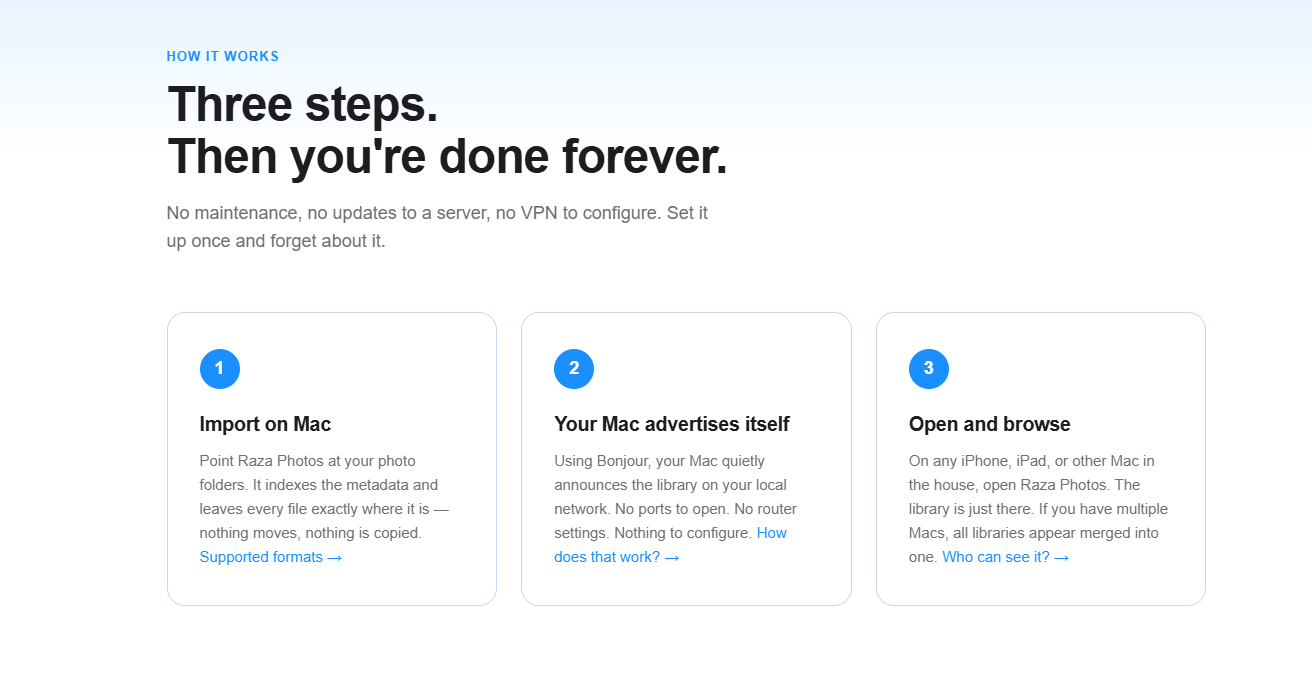
Raza Photos uses Bonjour, Apple’s zero-configuration networking protocol, to announce the Mac’s library on the local network. This is the same technology that makes AirDrop and AirPlay work. Your iPhone doesn’t need an IP address or any setup. It just listens, finds the Mac, and connects directly over Wi-Fi. The whole handshake takes about a second. If you have two Macs with photo libraries, both show up and their contents merge into one unified view.
Browse by Date, Place, People, Albums, and Events
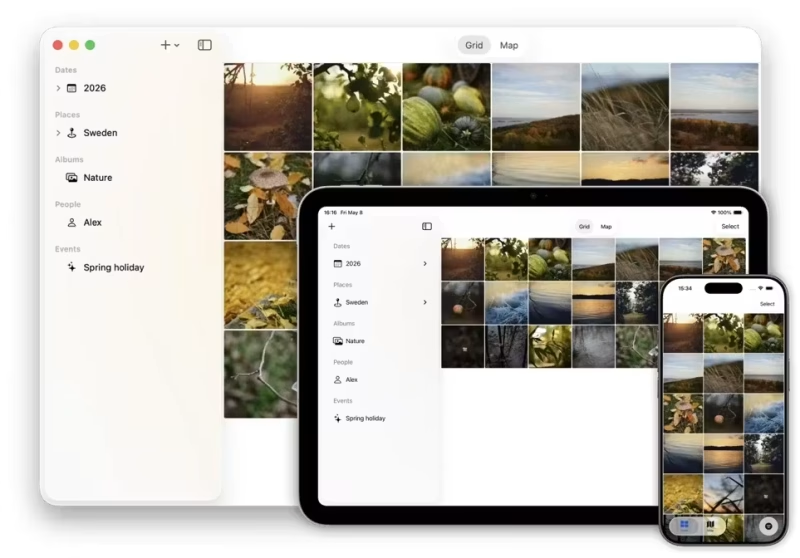
The app purposefully skips universal photo search in favor of a powerful sidebar filter designed around how your brain actually works. Instead of forcing you to guess text queries for memories you barely remember, Raza Photos lets you combine local filters instantly. Selecting a specific year automatically narrows down the available places, people, and events to just that timeframe. Because everything runs locally with zero remote server lag, the entire grid and all sidebar filters update the millisecond you click.
Local Face Detection and Map View
Face detection runs entirely on-device. No photo leaves your home network for recognition, not even briefly. Similarly, the map view shows every photo as a pin on an Apple Maps canvas. You can tap clusters to zoom in progressively, or open them directly in the grid. Reverse geocoding to fill in missing city and country names also runs on-device using Apple’s own frameworks.
Metadata Editing From the Couch
This is one of the more genuinely useful features. Instead of gatekeeping library management to your desktop, Raza Photos turns couch time into productive organization. If you have five minutes to spare with your phone or iPad, you can effortlessly fix a wrong date, assign locations, or tag faces in bulk, even selecting a hundred photos at once for batch updates. Best of all, these changes can be written directly back to the original files as standard EXIF and XMP metadata, leaving your pixels completely untouched. It’s heavy-duty library management hidden inside a casual mobile experience.
HDR, Live Photos, and Burst Navigation
Because this is a native app, not a browser-based viewer, HDR gain maps render correctly and Live Photos play exactly as they do in Photos.app. Burst sequences get their own navigation axis: swipe horizontally to move through your timeline, swipe vertically to step through burst frames. You never accidentally scroll past forty nearly-identical shots to get to the next photo.
The Kitchen Table Moment: A Real Scenario
Elena set up Raza Photos on a Saturday afternoon in early June. She pointed it at the photo folders on her Mac mini, which took about three minutes. She did nothing else. No port forwarding, no router settings, no Docker containers, nothing. She wants nothing to do with a loud, expensive storage rig humming in her closet.
That evening at 7:30 PM, her parents were visiting for dinner. Her father mentioned the family trip to Sicily from two years ago. Her mother wanted to see the photos of the market in Palermo. Elena picked up her iPhone from the kitchen counter, opened Raza Photos, tapped Places in the sidebar, tapped Italy, and handed the phone to her mother. Her mother scrolled through the whole Sicily album at the dinner table while the pasta finished cooking.
The Mac mini upstairs never entered the conversation. Nobody opened a browser. Nobody typed a password. The library was just there, the same way the Wi-Fi is just there. That is the outcome Raza Photos is designed to deliver: all the benefits of self-hosting, with zero of the tinkering headaches.
How the Setup Actually Works
Step 1: Import on Mac
Open the Mac app and point it at your photo folders. Raza Photos indexes the metadata and leaves every file exactly where it is. Nothing is copied or moved. Supported formats include HEIC, JPEG, PNG, TIFF, PSD, AVIF, and the standard video containers your iPhone produces.
Step 2: The Mac Announces Itself
With sharing enabled, your Mac broadcasts a Bonjour announcement on the local network once per second. No ports to open. No router settings to touch. Crucially for families, the sharing panel lets you toggle sharing and editing on or off. You can also set a child’s iPad to disallow editing and command the host Mac to refuse all remote editing entirely. You can hand your device to your kids completely stress-free, knowing they can’t accidentally delete or alter a single memory.
Step 3: Open and Browse on Any Device
On any iPhone, iPad, or other Mac connected to the same Wi-Fi, open Raza Photos. The library appears within a second or two. If multiple Macs are sharing libraries, they all show up and their filters are deduplicated into one clean view.
Pricing
Raza Photos is currently free to download and use. The developer has stated it will move to a one-time purchase of around $20 USD. There is no subscription, which is the whole point. You pay once, or right now you pay nothing, and the app keeps working regardless of what happens to any cloud service in the future.
Who Should Try This
If you have an Apple household and you have been wrestling with the cost or the privacy implications of keeping your entire photo history on someone else’s servers, Raza Photos is a genuinely well-considered alternative. It asks very little of you technically and gives back a lot in terms of access and control. Go try it at razasoftware.eu while it is still free.