If you’ve ever tried to maintain live coupon data across CJ Affiliate, Awin, Impact, and a handful of other networks at the same time, you know exactly how miserable that job gets. Different authentication schemes, inconsistent field names, rate limits that don’t match, and expired voucher codes that somehow stay alive in your database for weeks. It’s a mess that costs real engineering hours every month.
Feedico is a recently launched affiliate API aggregator that tackles this problem directly. It ingests partner feeds from multiple networks, normalizes everything into one consistent schema, and exposes a single REST API that coupon sites, WordPress publishers, cashback apps, and browser extensions can integrate against once and actually rely on.
The pitch is simple: stop maintaining a separate client library for every network you deal with. Integrate Feedico once, and get a unified feed of merchants, coupons, and deals with consistent pagination, filtering, and coupon objects across all your sources.
Key Features of Feedico
Unified Affiliate API Across Multiple Networks
Feedico currently supports CJ, Awin, Impact, Partnerize, Admitad, and TradeTracker, with more networks on the roadmap. Instead of juggling five different JSON dialects and auth flows, you get one normalized contract. Merchants and coupons come back in the same shape regardless of which network they originated from. That consistency alone saves significant back-end work for any publisher managing more than two networks.
Automated Feed Sync with Queues and Backoff
Manual CSV jobs break. Everyone who has run a coupon site on a spreadsheet-based pipeline knows this firsthand. Feedico uses scheduled sync with built-in queues and backoff logic to keep feeds fresh automatically. No more logging in on a Saturday morning to figure out why your deals table is stale. The system handles retries and scheduling so your data stays current without intervention.
Webhooks and Export Options
Beyond the REST API, Feedico supports optional webhooks and data exports for teams that need more flexibility in how they consume updates. Whether your stack pulls data or prefers to receive pushes, there’s a path that fits. A dashboard covers credentials and feed health, so your ops team can monitor status without digging through logs.
WordPress Plugin and Desktop Sync
Not every affiliate publisher is running a custom headless frontend. Feedico includes a WordPress plugin and a local desktop sync option, which means smaller publishers or content-first affiliate sites can tap into the same normalized feed infrastructure without writing much code at all. That’s a practical detail that sets it apart from pure developer-only API tools.
How Marcus Saved His Friday Afternoon With Feedico
Marcus runs a mid-sized coupon portal in the UK. His site aggregates deals from around eight affiliate programs, and until recently, he had a custom script for each network that would pull CSVs every few hours, parse them, and dump records into his database. It worked, barely, until it didn’t.
Last month, on a Friday at around 3pm, Marcus noticed his Awin-sourced coupons had stopped updating. The network had quietly changed a field name in their export format, and his parser broke silently. By the time he caught it, roughly six hours of deals had gone stale on his site during peak browsing traffic. He spent the rest of the evening patching it instead of finishing a separate feature he’d been building all week.
After setting up Feedico the following week, Marcus connected his Awin and CJ credentials through the dashboard in under an hour. He replaced both custom scripts with a single call to Feedico’s REST API. When he tested it at 9am on a Tuesday by deliberately filtering for coupons with upcoming expirations, the results came back normalized and accurate across both networks in the same response. No field mismatches, no separate parsing logic. He pushed the change to production before lunch and hasn’t touched the integration since.
How Feedico Connects Your Networks
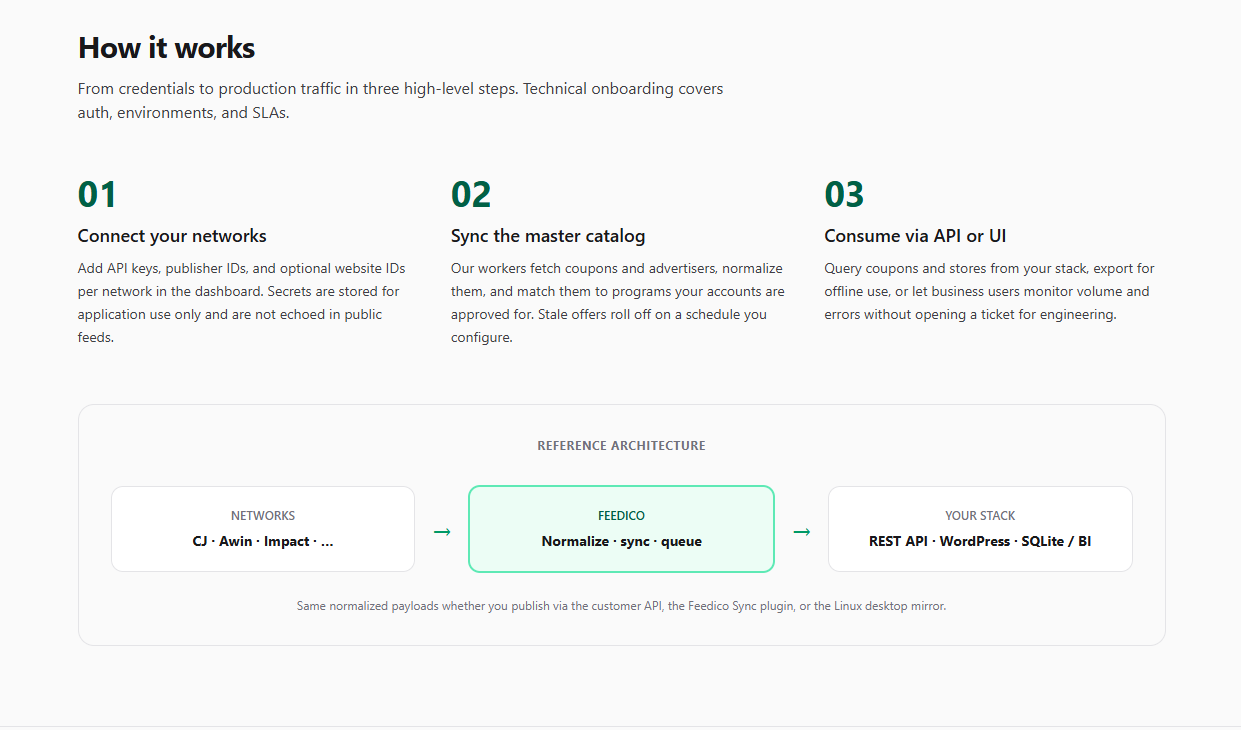
Step 1: Connect Your Network Credentials
You add your affiliate network credentials through Feedico’s dashboard. The platform handles authentication per network so you don’t have to manage tokens or API keys across multiple places in your own codebase.
Step 2: Feedico Ingests and Normalizes
Once connected, Feedico pulls data from each network on a scheduled basis, maps everything to a consistent schema, and handles the normalization of coupon fields, merchant data, and tracking links. Expiration dates, discount types, and merchant identifiers all land in the same format regardless of source.
Step 3: Query the Unified API
Your app, site, or plugin queries one endpoint. You filter by network, merchant, coupon type, or expiration window using a single consistent API contract. Webhooks can push updates to your system as they arrive, or you can pull on your own schedule. Either way, the data contract doesn’t change when a network updates its own schema.
Who Should Give Feedico a Look
This is a focused tool for a specific kind of builder: coupon site developers, affiliate WordPress publishers, cashback app teams, and anyone shipping a deal aggregator who is tired of maintaining brittle per-network pipelines. If you work with more than two affiliate networks and you’re still handling feed normalization manually, Feedico is worth testing. A free option is available, so the barrier to try it is low. Head over to feedico.io and connect your first network to see how the unified feed actually behaves with your real data.