You know the routine. You find a couch you want, bookmark it, then spend the next six weeks reopening that tab hoping the price moved. It never moves when you’re looking. Then one day you forget to check, and it drops $150, and you miss it entirely. That cycle is exhausting, and it’s completely avoidable.
TagDrop is a price tracking app for iOS, Android, and the web that watches product pages for you. Paste or share a link once, and it monitors the price, stores the history, and sends you an alert as soon as TagDrop detects a meaningful change.No more manual tab-hopping.
The app was built by Gene Collins, who got tired of checking the same product pages over and over while waiting for a better deal. That very specific frustration turned into something genuinely useful, especially for bigger purchases where waiting for the right moment actually saves real money.
Key Features of TagDrop
Universal Price Tracking Across Most Sites
TagDrop works on most product pages around the web, not just Amazon. Electronics, furniture, appliances, tools, used vehicle listings, local store pages: if a public product page shows a price, TagDrop can usually read it and track it, though some login-protected, checkout, bot-blocked, or highly dynamic pages may be limited. That breadth is one of the things that sets it apart from browser extensions that only work on a handful of major retailers.
Price History Charts
Every tracked item builds a price history over time. This is genuinely useful because it tells you whether a current “sale” is actually a good deal or just a marketing tactic. Early users have called out the price history feature as especially useful because it helps separate real drops from routine price noise.
Trust and Verification Signals
TagDrop runs an automatic risk check on every store you track. It looks at SSL certificates, Google Safe Browsing status, return policies, and payment gateway signals, then labels the site with a trust signal such as Verified, Caution, or Risky. It’s not a guarantee, but it adds a useful layer of context when you’re buying from a store you’ve never heard of.
Screenshot Tracking as a Backup
Can’t copy a URL? The mobile app lets you take a screenshot of a product page, and TagDrop’s AI will try to extract the price information automatically when the screenshot has enough visible context. It’s a smart fallback for pages that are hard to share directly, and it keeps the tracking flow quick regardless of where you found the item.
How TagDrop Helped Marcus Save $150 on a Sectional
Here’s a typical example of how TagDrop can help: Marcus, a teacher in Austin, had been eyeing a sectional sofa on a furniture retailer’s website for about two months. Every Sunday morning around 9 am, he’d open his laptop, navigate to the product page, check the price, sigh at the $899 tag, and close the tab. Same result every week.
In late March, he pasted the URL into TagDrop and forgot about it. Three weeks later, on a Tuesday afternoon while he was grading papers, his phone buzzed with a push notification: the sofa had dropped to $749, down 17 percent. He hadn’t visited the page once in those three weeks.
He bought it that evening. The $150 he saved more than covered the cost of a Pro subscription for the rest of the year. More importantly, he didn’t have to think about it at all between the moment he added it to TagDrop and the moment the alert arrived. That’s the actual value: not just the savings, but the mental quiet in between.
How TagDrop Works, Step by Step
Step 1: Add the Product
Open the mobile app; you can share a link directly to TagDrop from your browser or paste the product URL. In the web-app you can paste the URL to track. If the URL is hard to grab, take a screenshot and the AI will pull the price from the image.
Step 2: TagDrop Extracts and Monitors the Price
TagDrop reads the product title, current price, and store name from the page. From that point on, it checks the page automatically at intervals depending on your plan, ranging from twice daily on the free tier up to hourly on Premium.
Step 3: Get the Alert
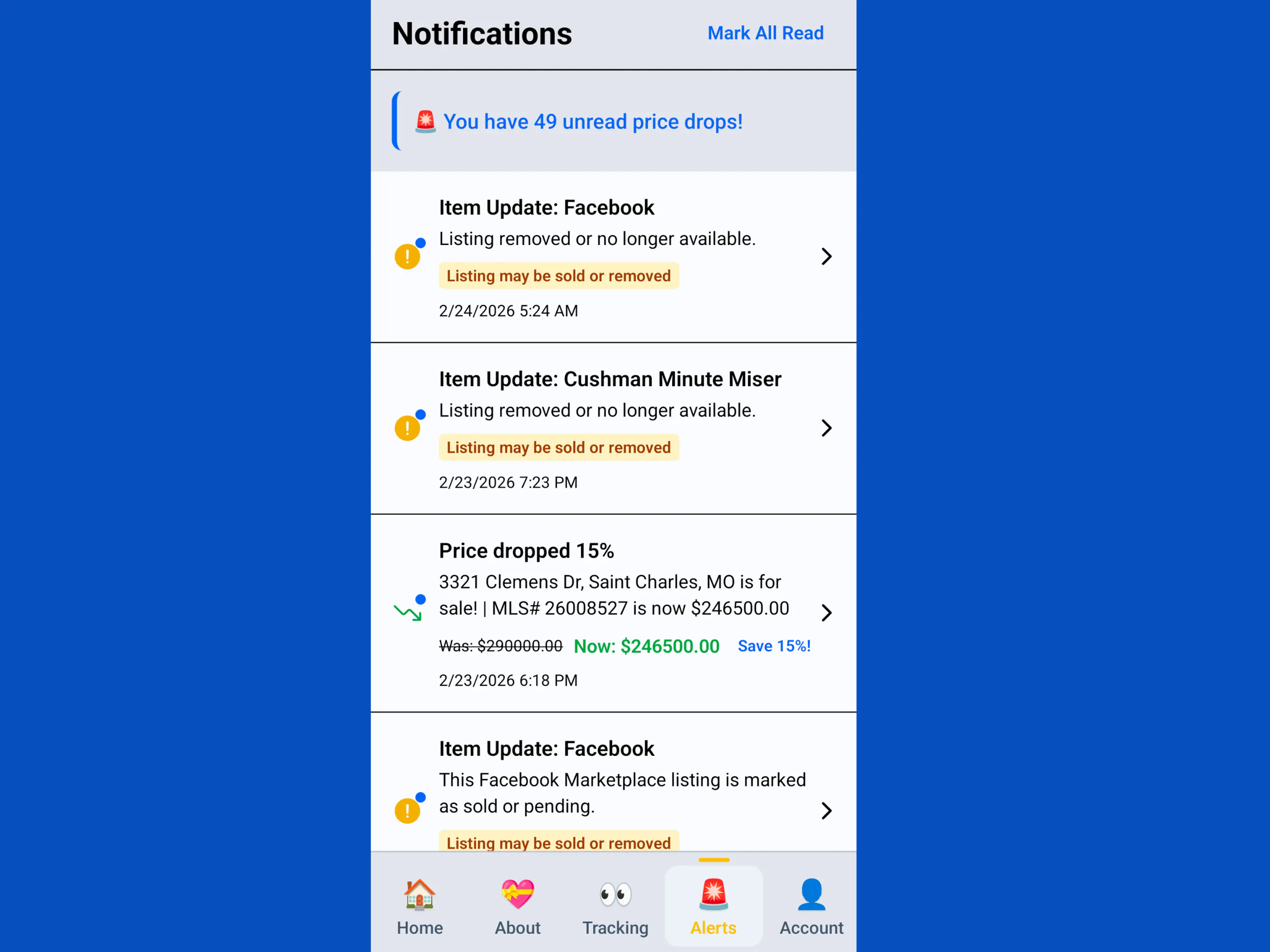
When the price drops or increases, stock changes, or the item is no longer available, you can get an email, a mobile push notification, and an in-app alert depending on your settings and platform. The alert includes the old price, the new price, and a direct link back to the product page so you can act immediately.
TagDrop Pricing
There are four plans, all billed monthly with no long-term commitment:
- Free: Up to 5 items, checks up to 2x daily, 15 AI scans per month
- Mini ($1.99/month): Up to 15 items, daily checks, 30 AI scans
- Pro ($4.99/month): Up to 50 items, checks up to 5x daily, 100 AI scans
- Premium ($12.99/month): Unlimited items, hourly checks, 150 AI scans
All plans include price-drop alerts, trust verification, email and push notifications. New subscribers get a 7-day money-back guarantee, no questions asked.
One More Thing: Where TagDrop Is Headed
The current version is a solid consumer tool, but the roadmap points somewhere bigger. Gene’s long-term vision is to build TagDrop into an AI-powered tracking layer that monitors not just prices but availability, product changes, and broader market signals across any supported page. There’s also a business angle already in the product: small businesses and property managers can already use the web app to track recurring supply purchases and get weekly reports on price movements, which is a clever extension of the same core idea.
Worth Trying If You Buy Big or Buy Often
TagDrop is a good fit for anyone who makes considered purchases: furniture shoppers, electronics buyers, contractors watching supply costs, or anyone who’s ever refreshed a product page and thought “there has to be a better way.” The free plan is a solid starting point with no credit card required. Head to tagdrop.io to start tracking your first items today.