


You’re 400 pages into a sprawling fantasy series. A name appears that feels vaguely familiar, but you can’t quite place it. So you do what most readers do: you open a browser tab, search the character’s name, and within seconds you’ve accidentally read something that happens three books from now. Flow gone. Immersion shattered. It’s a genuinely frustrating problem, and it happens constantly with complex fantasy and sci-fi.
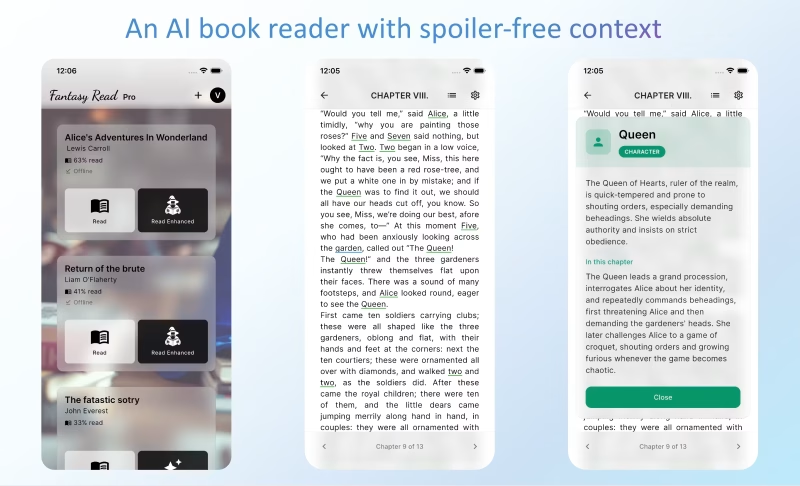
Fantasy Read is a new EPUB reader built specifically to fix that. It adds instant, inline context for characters, places, and concepts, pulling only from the sections you’ve already read. No spoilers. No chat interface. No loading screens. Just a quiet tap and you’re back in the story before the thought fully forms.
The app launched recently on Product Hunt and it’s already drawing attention from readers who spend serious time with dense, multi-character narratives. The core idea is simple but the execution is genuinely thoughtful, and it’s worth taking a close look at what’s actually under the hood.
Key Features of Fantasy Read
The Sage: Inline, Spoiler-Free Context
The Sage is the AI engine at the heart of Fantasy Read. When you upload a DRM-free EPUB, The Sage pre-processes the entire book, identifying characters, locations, concepts, and key plot points. It then embeds inline highlights throughout the text. Tap any highlighted name or term and a compact context card appears instantly. Critically, The Sage only surfaces information from what you’ve already read. If you’re in chapter 10, it knows nothing about chapter 11. That restraint is a deliberate architectural choice, not an afterthought.
No Chat UI, No Loading Screens
Most AI reading tools make you type a question and wait for a response. Fantasy Read takes the opposite approach. Because context is pre-processed before you start reading, every explanation loads instantly. There’s no chat window to open, no query to type, no spinner to watch. You tap, you read the card, you close it and continue. The whole interaction takes maybe three seconds. For readers who guard their immersion carefully, that difference is significant.
Offline Reading Support
The pre-processing approach has a useful side effect: everything works offline. Your library, your reading progress, and all The Sage’s context cards are available without an internet connection. That makes Fantasy Read genuinely useful on planes, during commutes, or anywhere connectivity is spotty. It’s a small detail that matters a lot in practice.
Bring Your Own EPUB Library
Fantasy Read doesn’t lock you into a proprietary store. Upload the DRM-free EPUBs you already legally own and your library syncs across both the iOS app and the web browser version. Android support is listed as coming soon. Your uploaded books are private to your account; the platform doesn’t share or redistribute them.
The Scenario: Marcus Tackles The Wheel of Time at 10pm
Marcus, a 34-year-old software developer based in Edinburgh, picked up The Shadow Rising after a two-week break from reading. It was around 10pm on a Tuesday and he had maybe 45 minutes before he needed to sleep. He knew he’d lost track of a handful of minor characters from earlier in the series, the kind of names that appear once every hundred pages and carry real plot weight when they resurface.
In the past, Marcus kept a browser tab open to a fan wiki. He’d used it a dozen times already in this series, and twice he’d accidentally read something that hadn’t happened yet. Both times it took days to shake the frustration.
With Fantasy Read loaded on his iPhone, he opened the book in Enhanced Read mode and picked up where he left off. Within five minutes, a character name came up that he couldn’t immediately place. He tapped it. A small card appeared with a clean summary: who this person was, what faction they belonged to, how they’d been introduced. All drawn from chapters he’d already read. He closed the card and kept going. No browser. No wiki. No spoilers. He read for the full 45 minutes without breaking flow once, and woke up the next morning actually wanting to continue, which is the whole point.
How The Sage Processes Your Book
Step 1: Upload Your EPUB
Add any DRM-free EPUB you legally own to your Fantasy Read library via the iOS app or the web reader. The upload process is straightforward, similar to adding a file to any cloud service.
Step 2: The Sage Pre-Processes the Text
Before you start reading, The Sage analyzes the entire book. It maps characters, relationships, locations, factions, and key concepts, then embeds contextual highlights directly into the text. Processing time varies by book length, but it happens once, before your first session.
Step 3: Read and Tap as Needed
Open the book in Enhanced Read mode. Highlighted terms appear inline. Tap any one of them to get an instant context card, filtered to only what you’ve encountered so far. Close the card and continue reading. Everything is local after processing, so it works offline too.
Pricing
Fantasy Read offers two tiers:
- Free Plan: Upload unlimited books, read on any device, offline mode included, no credit card required.
- Pro Plan: $8.99 per month after a free first month. Includes everything in Free plus unlimited access to The Sage’s inline context features. No commitment; cancel anytime.
The first month of Pro is free, which gives you plenty of time to work through a full novel and decide if the enhanced reading experience is worth it for you.
Who Should Try Fantasy Read
If you read epic fantasy, sprawling sci-fi, historical fiction with large casts, or any book that rewards careful attention to names and factions, Fantasy Read is worth your time. It’s especially useful if you read slowly over weeks or months and need a memory aid that won’t spoil anything. Try it at fantasyread.ai. The free plan is a genuine starting point, and the first month of Pro costs nothing to find out whether The Sage changes how you read.


