Most of us know we should move more during the workday. We just never actually do it. The intention is there, then 4 PM arrives and you’ve been sitting for six straight hours without standing up once. Squat Reminder is a free iPhone and Apple Watch app built around one simple idea: a single bodyweight squat, repeated in small sets throughout the day, is enough to keep your body active without disrupting your workflow.
It’s not trying to be a full fitness platform. No workout plans, no calorie goals, no social features. Just a reminder to squat, automatic rep counting via your Apple Watch, and a habit tracker that shows whether you’re actually staying consistent. The whole setup takes under 30 seconds.
Nick Baldjiev, the developer behind the app, built it because he was spending long stretches sitting at a desk and wanted something that didn’t require switching mental gears to use. The result is genuinely minimal: open the app, set your interval, and let it run in the background.
Key Features of Squat Reminder
Automatic Rep Counting on Apple Watch
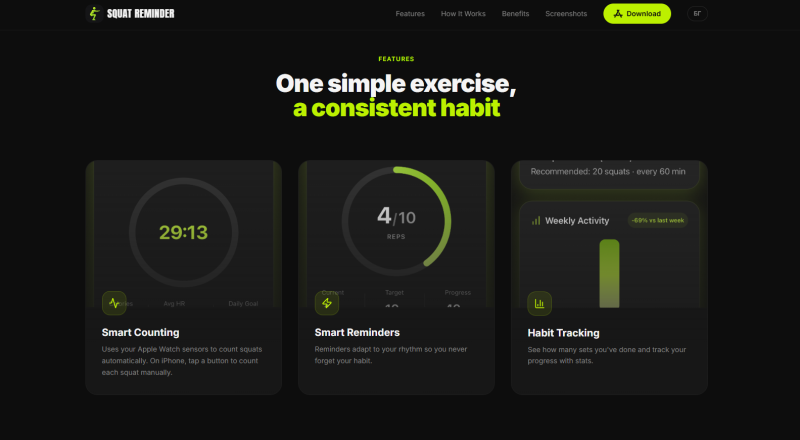
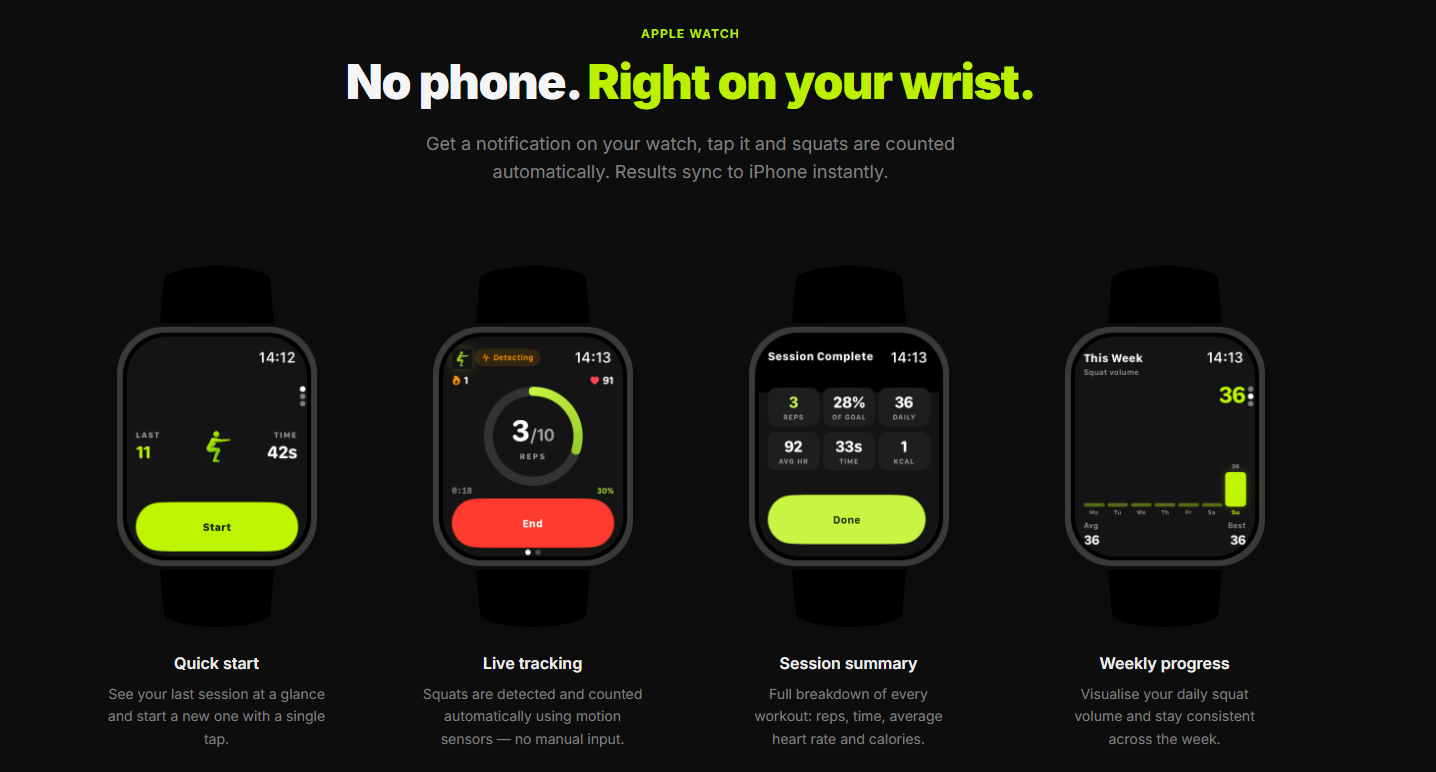
This is the headline feature. When you get a notification on your Apple Watch, you tap it, do your squats, and the app counts every rep using the watch’s built-in motion sensors. No tapping a button between reps, no staring at a screen. You just move. Session data, including reps, time, average heart rate, and estimated calories, syncs to iPhone immediately after you finish.
Smart Reminders That Adapt to You
You choose the interval: every hour, every two hours, whatever suits your schedule. The app sends a notification at the scheduled time and nudges you to stand up. Reminders adjust based on your rhythm so they don’t pile up or fire at awkward moments. It’s a small detail, but it matters for building something you’ll actually stick with long-term.
Habit Tracking With Weekly Stats
The app tracks how many sets you complete each day and visualizes your weekly squat volume in a simple chart. You can see at a glance whether you’re staying consistent or slipping. There’s no gamification or streak pressure, just clean data that reflects what you’ve actually done.
Manual Counting on iPhone
No Apple Watch? Not a problem. On iPhone, you tap a button for each rep manually. It’s a slightly more hands-on experience, but the reminder system and habit tracker work exactly the same way. The app is genuinely usable with either device.
How Marcus Got 40 Squats Done Before Lunch
Marcus, a 34-year-old software developer based in Berlin, has a standing rule: no gym during the workweek. He just doesn’t have the bandwidth. But by mid-March he noticed his lower back was constantly tight and his energy was dropping hard around 3 PM every afternoon.
He downloaded Squat Reminder on a Tuesday and set reminders for every 90 minutes, starting at 9 AM. At 10:30 AM, while mid-way through reviewing a pull request, his Apple Watch buzzed. He stood up from his desk, knocked out 12 squats in about 40 seconds, and sat back down. The app registered every rep automatically. No phone, no tapping, just movement.
By noon he had completed three sets totaling 36 reps. That evening, checking the iPhone app, he could see the full breakdown: reps per session, average heart rate during each set, and his weekly volume starting to build. After two weeks, Marcus told a colleague he hadn’t felt the 3 PM energy slump in days. His lower back tension had eased noticeably. He credited the micro-breaks more than anything else.
The key detail here is that he never once had to think about counting. That removed the main friction point that had killed every previous habit attempt.
How Squat Reminder Actually Works
Step 1: Set Your Preferences
When you first open the app, you enter your birth year so the app can suggest a sensible starting point for rep count and interval frequency. You can adjust both at any time in Settings. The whole onboarding process takes less than a minute.
Step 2: The Reminder Finds You
At your scheduled interval, a notification appears on your iPhone or Apple Watch. You don’t need to open the app. On Apple Watch, you tap the notification directly to start the session.
Step 3: Squats Are Counted, Data Syncs
On Apple Watch, the motion sensors detect each squat automatically. On iPhone, you tap a button per rep. When you finish, the session summary appears: reps, duration, heart rate, calories. Data syncs to iPhone instantly if you used the watch.
Step 4: Check Your Progress
The habit tracker in the iPhone app shows your daily sets and a weekly volume chart. Open it at the end of the day to see how consistently you moved. That’s the whole loop.
Who Should Try Squat Reminder
If you sit at a desk for most of the day and want a genuinely low-effort way to add regular movement to your routine, this app is worth a download. It works best for Apple Watch owners who want hands-free tracking, but iPhone-only users get a fully functional experience too. The app is completely free with no ads and no subscription, which removes any barrier to trying it. Head over to squatreminder.app or find it on the App Store and give the first week a real shot.