Most personal finance apps are really just fancy spreadsheets. They tell you what you spent last Tuesday. Ask them whether you should sell your appreciated stock this year or next, and you get nothing useful. That gap is exactly what FinAdvisor was built to fill.
The product pitches itself as an AI-powered personal CFO. Connect your bank and brokerage accounts, and it gives you forward-looking financial advice in plain English, backed by your actual numbers. Not generic tips. Not one-size-fits-all guidance. Real answers tied to your income, your filing status, and your state’s tax rules.
What caught my attention was the tax optimizer module, specifically the capital gains timing feature. This is the kind of calculation that used to require a CPA phone call. FinAdvisor just… does it. And given that spreading a $300k gain across two tax years can save somewhere between $15,000 and $25,000 depending on your situation, that is not a trivial thing to get right.
What FinAdvisor Actually Does: Key Features
Tax Optimizer and Capital Gains Timing
This is the standout feature. FinAdvisor calculates your exact after-tax proceeds from selling shares this year versus next year versus splitting the sale across multiple years. It factors in your income bracket, filing status, state tax rates, the 3.8% Net Investment Income Tax that kicks in above $200k (single) or $250k (married filing jointly), and state-specific surtaxes like Massachusetts’s 4% millionaire surtax. Most apps ignore NIIT entirely. FinAdvisor accounts for it because it pulls your actual account data via Plaid, not estimates you typed in manually.
Investment Advisor
Connect your brokerage and retirement accounts and you get a unified portfolio view across all of them. The AI flags real issues: concentration risk, zero fixed income allocation, rebalancing opportunities. It benchmarks your returns against the S&P 500 and gives specific allocation suggestions. Not vague advice about diversification; concrete observations about what your actual portfolio is missing.

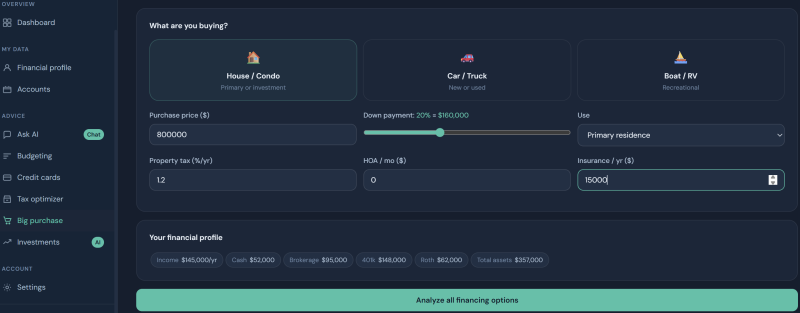
Big Purchase Planner
Thinking about a major purchase — a home, car, or boat? The planner models the true after-tax cost of liquidating brokerage assets to fund a down payment. It accounts for capital gains taxes on the shares you’d have to sell, the impact on your monthly cash flow, and how the purchase affects your net worth trajectory. This is a type of analysis that typically requires a spreadsheet and a few hours. Here it takes about two minutes.
Budgeting and Cash Flow Tracking
Accounts sync automatically via Plaid. Spending gets categorized, savings rates get tracked, and the AI surfaces suggestions based on your actual transaction history. It is not the most differentiated budgeting tool on the market, but having it in the same platform as your tax optimizer and investment advisor means the AI has the full picture when you ask it a question.
Credit Card Optimizer and AI Chat
The credit card module analyzes your actual spending patterns across categories and recommends which cards would maximize your rewards given how you actually spend — not generic top picks, but cards optimized for your specific mix of groceries, dining, travel, and subscriptions.
The AI chat assistant sits across all of this. Ask it anything, and it answers using your real connected data, not hypothetical scenarios.

Meet Marcus: A $180k Decision Made at 9pm on a Wednesday
Marcus, a 38-year-old software engineer in Boston, had been sitting on roughly $180,000 in unrealized gains across a concentrated tech position he built up over several years. He and his partner were planning to buy a house in early 2027 and needed to figure out the best way to fund the down payment from that brokerage account.
At around 9pm on a Wednesday, he opened FinAdvisor, which he had connected to his Fidelity account and checking account a few days earlier. He pulled up the tax optimizer and typed his question directly into the AI chat: what is the most tax-efficient way to liquidate this position to fund a down payment?
The response was specific. Selling the entire position in one calendar year would push Marcus into the 20% long-term capital gains bracket, plus trigger NIIT on the amount above the married-filing-jointly threshold. Massachusetts’s additional rates compounded the hit further. The AI walked through a two-year staging scenario: selling a portion before December 31 of the current year and the remainder in January, keeping each year’s gains below the bracket threshold. Estimated savings: approximately $19,000 compared to selling everything at once.
Marcus had no idea NIIT was a factor. He had assumed it only applied to much higher earners. By 9:30pm, he had a clear plan. No CPA call required.
How FinAdvisor Walks You Through It
Step 1: Connect Your Accounts
FinAdvisor uses Plaid to link bank accounts, brokerages, and credit cards. The connection is read-only, and setup takes about two minutes. You also enter your income, age, filing status, and state during onboarding, which is what enables the state-specific tax calculations.
Step 2: Get Your Financial Snapshot
Once connected, the dashboard pulls together net worth, monthly cash flow, savings rate, and investment performance into one view. The AI immediately has context across all of your accounts.
Step 3: Ask Your Actual Questions
From here, you can use any of the modules directly or just ask the AI chat assistant a plain-English question. The answers reference your real data. “How much 401k headroom do I have before hitting the next bracket?” gets a real number, not a generic tutorial about contribution limits.
Pricing
FinAdvisor offers a 7-day free trial with no credit card required at signup. The product is currently available to US residents only. Paid plans are available after the trial; specific tier pricing is listed at getfinadvisor.com. The free trial gives you full access to all modules, including the tax optimizer and capital gains timing tool.
Worth Trying If Tax Season Costs You More Than It Should
FinAdvisor is built for people who have real financial complexity: appreciated stock, multiple accounts, a major purchase coming up, income near a tax bracket threshold. If your finances are genuinely simple, the budgeting features alone probably do not justify it. But if you have ever wondered whether to sell this year or next and just guessed, this tool answers that question with actual math.