Most car owners have some version of the same system: a glove box stuffed with faded receipts, a phone note that stopped being updated six months ago, and a vague memory that the oil was changed sometime before winter. It works, sort of, until it doesn’t. Until a prospective buyer asks for service records, or you’re at the mechanic trying to remember whether those brakes were done at 40,000 or 50,000 miles.
Maintory is a calm iPhone app built by indie maker to fix exactly this problem. It turns every oil change, fuel stop, repair, and insurance payment into a clean, searchable timeline connected to your car. No spreadsheets. No sign-up required. No alarming red notifications telling you the world is ending because your tire rotation is overdue.
What makes it stand out isn’t any single feature. It’s the overall attitude. Where most car apps feel like they were built for fleet managers or mechanics, Maintory is clearly built for the person who just wants to know what was done to their car, when, and how much it cost.
Key Features of Maintory
The Car Timeline
Every entry you log, whether it’s a $58 fuel stop or a $400 brake job, gets added to a chronological timeline tied to your specific vehicle. You see date, mileage, cost, category, and any notes you added. It reads more like a journal than a database, and that matters. Looking back at three years of records actually feels useful rather than overwhelming.
Mileage and Date Reminders
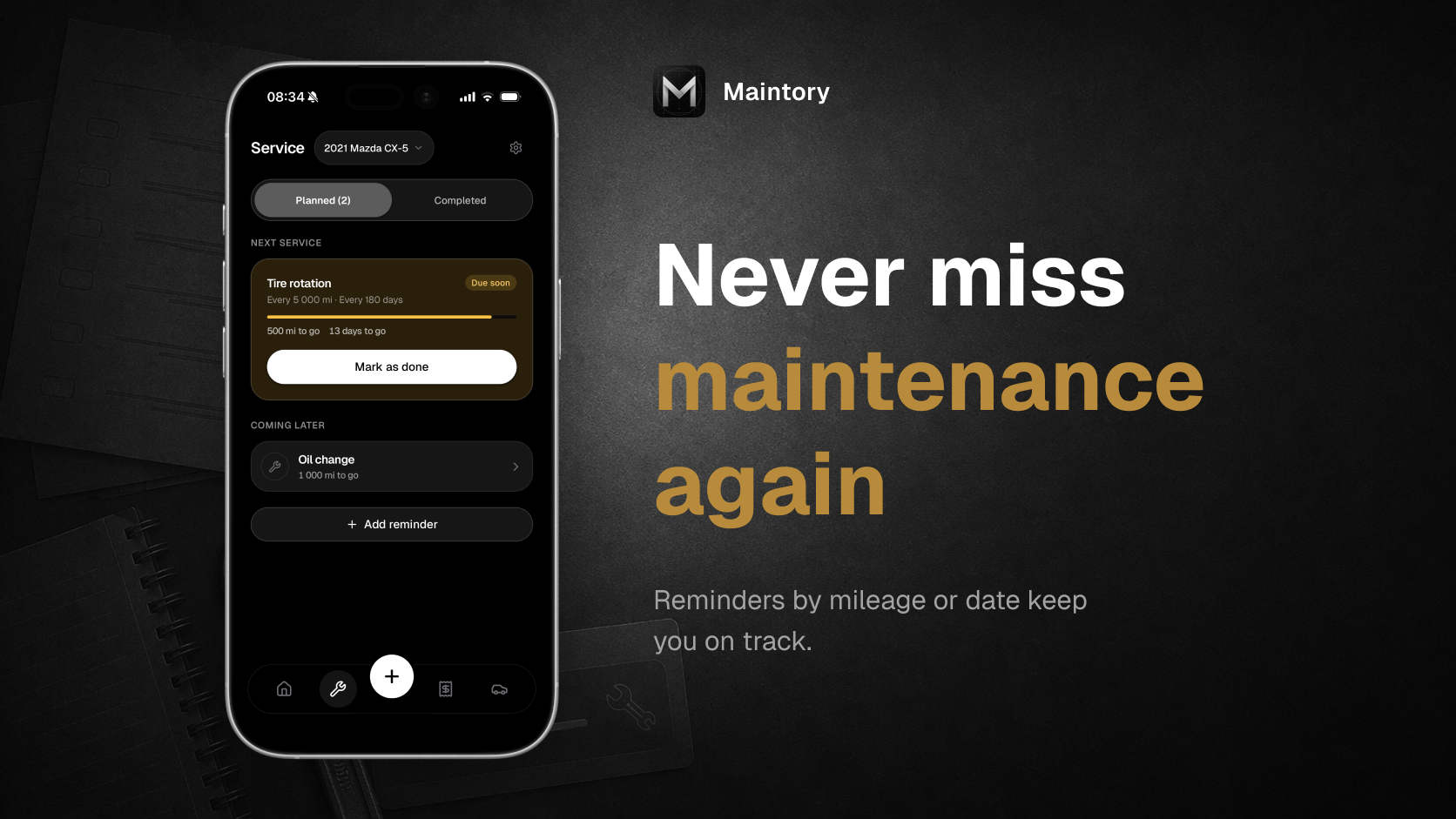
Set a reminder for your next oil change by mileage, by date, or both. Maintory quietly tracks the distance remaining and flags the service when it’s getting close, with plain language like “Oil change due soon” rather than a wall of warning icons. You can set custom intervals for anything: tire rotations, brake checks, registration, air filters, whatever your car needs.
Receipt Scanning
Point your camera at a fuel receipt or service invoice, and Maintory pulls out the relevant details. No typing a string of numbers from a crumpled slip in a parking lot. The receipt stays attached to the specific log entry it belongs to, so you can find it months later without digging through your camera roll.

Ownership Cost Summaries
Maintory breaks down your spending by week, month, quarter, or year, organized by category: fuel, service, repairs, insurance, and more. It’s not trying to be a personal finance app. The summaries are simple and readable, designed for understanding rather than accounting.
PDF Export for Resale
When it’s time to sell, you can export your car’s full service and expense history as a polished PDF. This is genuinely one of the most practical features in the app. Handing a buyer a clean, printed history of every service done over four years of ownership is a different conversation entirely than saying “I think I kept up with it.”
Marcus Tries to Sell His Civic at 9am on a Saturday
Marcus, a 34-year-old teacher from Columbus, Ohio, had been planning to sell his 2020 Honda Civic for a few weeks. He’d listed it the previous Tuesday, and by Friday evening a serious buyer had asked for the full service history. Marcus opened Maintory at 9am Saturday, about an hour before the buyer was due to arrive.
He’d been logging entries for just over a year: three oil changes with scanned receipts, a tire rotation, a brake fluid flush, and every fuel stop since March. He tapped the export button. Maintory generated a clean PDF summarizing the timeline, the mileage at each service, and the total he’d spent on maintenance. He printed it out and left it on the passenger seat.
The buyer flipped through it, noted that the oil changes were done consistently and on schedule, and didn’t negotiate on price the way Marcus had expected. The sale closed at the asking price. Marcus said afterward that the PDF was the one thing that made the difference: the buyer could see the car had been looked after, not just claimed to be.

How Maintory Builds Your Car’s History
Step 1: Add Your Vehicle
Open the app, add your car by make, model, year, and current mileage. No account creation needed. The free tier supports one vehicle with full timeline access, reminders, and basic expense tracking.
Step 2: Log Entries as They Happen
Tap the plus button, pick a category (fuel, service, repair, insurance, or a custom type), enter the date, mileage, cost, and any notes. Scan a receipt if you have one. The whole process takes about 15 seconds once you’re familiar with the flow.
Step 3: Set Your Reminders
After logging an oil change, set the next reminder by mileage interval, date, or both. Maintory tracks the distance and time remaining and notifies you quietly before the service becomes overdue.
Step 4: Export When You Need It
When preparing for a sale or visiting a new mechanic, export the full history as a PDF. The premium tier ($2.99 per month, $12.99 per year, or $34.99 as a one-time lifetime purchase) also unlocks multiple vehicles and photo attachments.
Pricing
Maintory is free to start with one car, full timeline functionality, reminders, and basic expense tracking included. No trial timer, no feature walls on day one. The premium plan costs $2.99 per month, $12.99 per year, or $34.99 for a lifetime purchase. Premium adds multiple vehicles, PDF export, and photo attachments for receipts and invoices.
Who Should Try Maintory
If you own a car and have ever answered “I think so” when a mechanic asks when you last had the brakes checked, this app is for you. It’s particularly good for anyone planning to sell in the next year or two, since a documented history genuinely changes how buyers respond. Download Maintory for free on the App Store, or visit maintory.pro to learn more about what it does.