Most stock charting tools these days want a monthly subscription, a browser tab permanently open, and your data sitting on someone else’s server. [AptiStockX] takes the opposite position. It is a native desktop application for Windows, macOS, and Linux, built by AptiStock LLC, the developer behind AptiStock, a charting tool first released in 2005 and used by self-directed traders for roughly two decades.
This isn’t a startup pivoting into finance. It’s a deliberate modernization of software with real history. AptiStockX 3.0 carries the same local-first philosophy forward: your chart files, workspaces, watchlists, downloaded data, and license all live on your own machine. No cloud account required to open a chart.
The result is a serious workstation tool for traders and researchers who want to own their setup instead of renting access to it indefinitely.
Key Features of AptiStockX
Local-First Data Ownership
AptiStockX keeps the charting workflow local and inspectable. Market data can be downloaded as CSV files that users can open, inspect, back up, or move. Workspaces and chart templates use local files rather than a cloud-only account model. This is the core principle behind the original AptiStock, and AptiStockX keeps it intact.
Native Qt/C++ Performance Across Three Platforms
AptiStockX is built with Qt/C++, not as a browser wrapper. That matters for users who load long historical datasets or keep multiple charts open. The app runs natively on Windows, macOS, and Linux, with the same local workflow across all three platforms.
Customizable Indicators and Drawing Studies
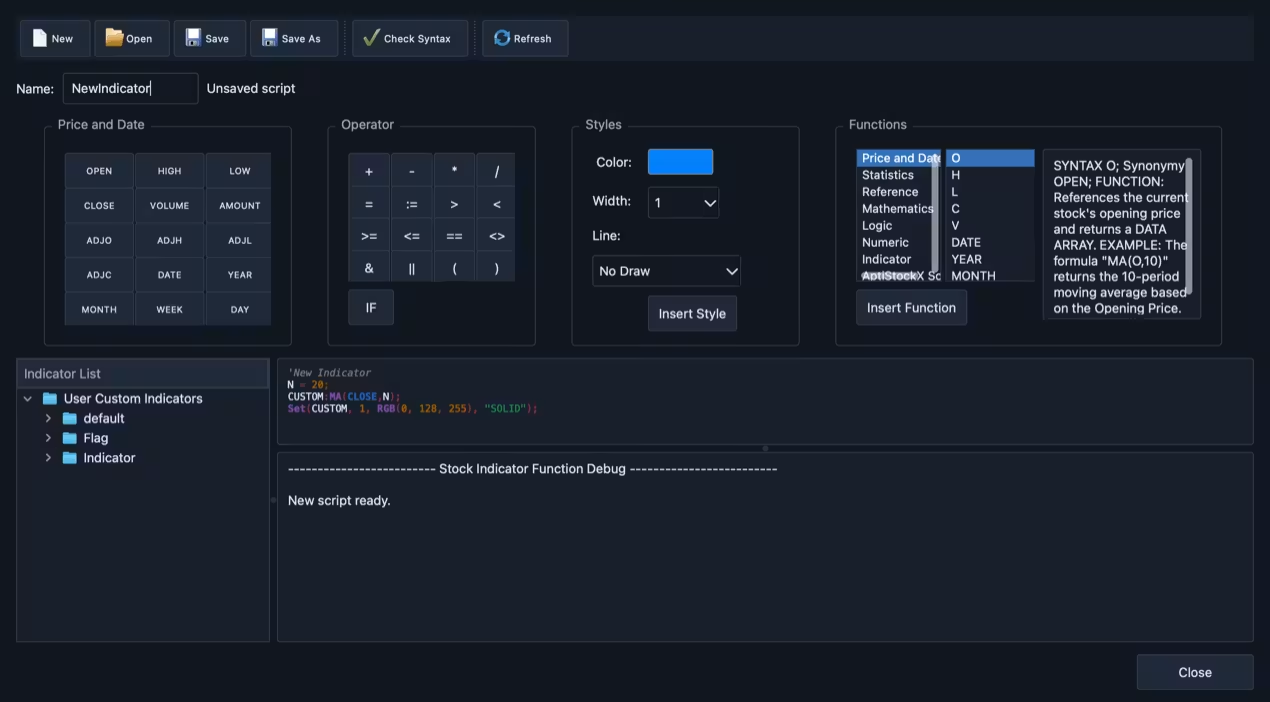
The Pro tier includes custom indicator scripting, expanded line studies, Fibonacci and Gann tools, channels, shapes, and saved workflows. You can write your own indicator logic and apply it alongside the standard built-in set. Chart styles include Heikin-Ashi, Renko, Range, and hollow candles, giving you real flexibility in how price action is visualized.
Multi-Monitor Workspace Support
AptiStockX supports multi-window and multi-monitor workflows. Users can work with multiple charts, detach chart windows, and spread their research workspace across more than one display. For active chart users, this is a practical desktop feature rather than a cosmetic extra.
AI Assistant for Chart Review
Pro includes an AI Assistant for educational chart review. It’s positioned as a research aid, not a trading signal service. The distinction matters: AptiStockX is charting software, not financial advice or trade execution. The AI feature sits inside the same local desktop environment and is accessed from within the app.
A Trader’s Sunday Morning Workflow With AptiStockX
Marcus, a self-directed swing trader based in Austin, Texas, spends his Sunday mornings reviewing weekly setups before the market opens Monday. At 8:15 AM, he sat down to work through his watchlist of twelve ETFs and sector stocks. His previous charting tool was browser-based, and he’d grown tired of slow load times and worrying about his annotated workspaces disappearing after a plan change.
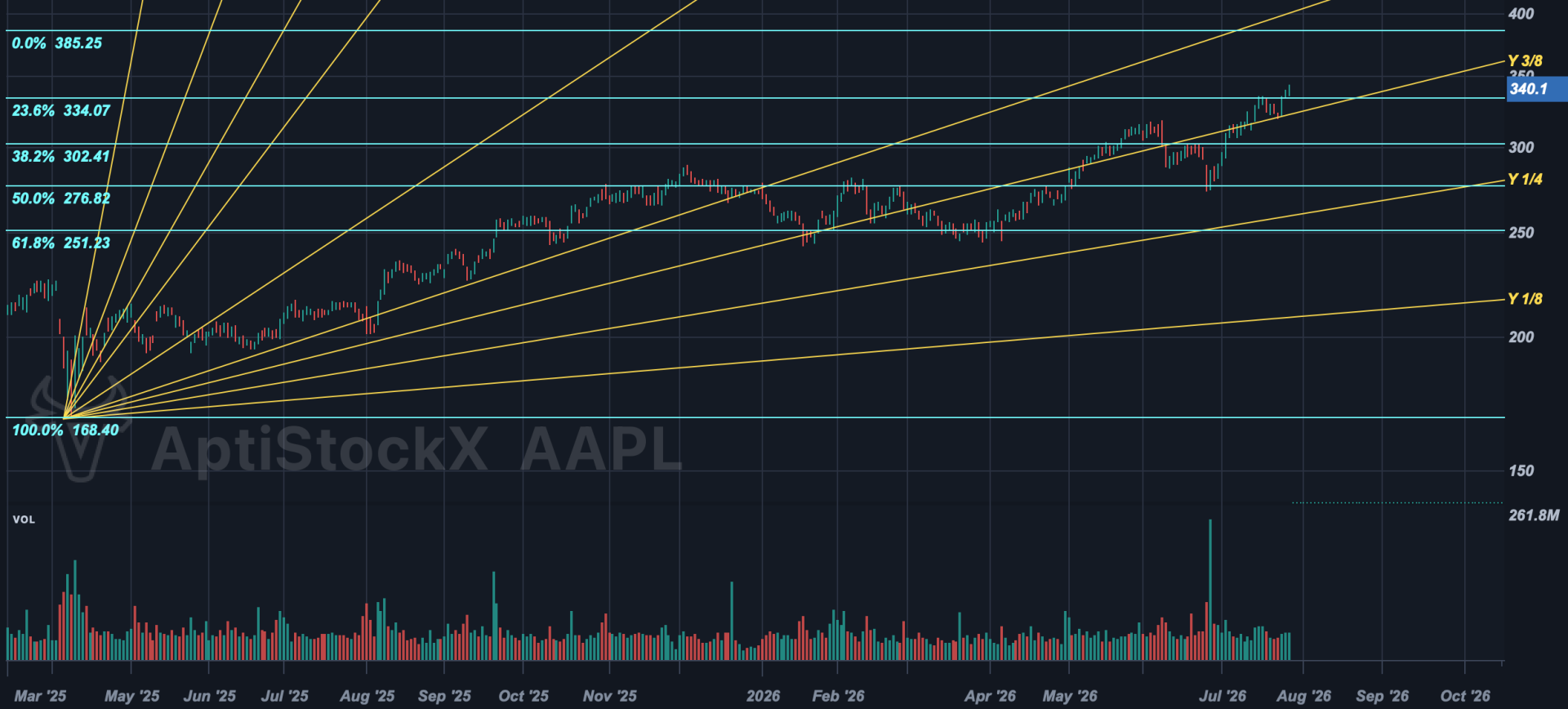
He had installed AptiStockX the previous week and pulled his data through his Alpaca account using the provider settings panel. On Sunday morning, he opened his saved workspace, and all twelve charts loaded immediately from local CSV files, no internet required. He spent few minutes drawing Gann fan lines on AAPL’s weekly chart (the similar study visible in the app’s own screenshots), added Fibonacci retracement levels to two energy names, and saved the workspace as a JSON file he then copied to his backup drive.
By 9:30 AM, Marcus had a clean set of annotated charts ready for the week. The whole session ran without a single reload, a spinning indicator, or a prompt to upgrade his subscription tier. He noted afterward that the app felt like the desktop tools he used fifteen years ago, except actually maintained and cross-platform.
How AptiStockX Gets You From Install to Charting
Step 1: Download and Install
Head to the downloads page and grab the installer for your platform. Windows users get a standard .exe setup file. macOS users get a signed and notarized universal .dmg. Linux users can install via Snap, a Debian package, or an AppImage. All three are on the same 3.0 release.
Step 2: Connect a Data Provider
Open Settings, then Data Provider Setting. AptiStockX supports Alpha Vantage, Tiingo, and Alpaca as data sources for EOD, intraday, and quote data. Paste your API key into the relevant tab. Your credentials are stored through the operating system’s credential store, not in a cloud profile.
Step 3: Start the Pro Trial (Optional)
To test the full Pro workflow, choose **Help > Start 7-Day Pro Trial** inside the app. Enter an email address, confirm the verification code, and AptiStockX installs a signed local trial license. No payment page is required to start the trial.
Step 4: Build Your Workspace
Create charts, apply indicators, draw studies, set up watchlists, and save the workspace locally. The result is a charting setup that users can back up, move, and restore without depending on a cloud workspace account.
AptiStockX Pricing
AptiStockX has a simple pricing structure:
- Basic: Free, unlimited use. Includes core local charting, daily and higher timeframes, standard indicators, and a single chart window/workspace.
- Pro Trial: Free 7-day in-app trial. Lets users test Pro workflows such as intraday periods where provider data allows, advanced studies, AI Assistant, and multi-monitor workflows before buying.
- Pro: $99 one-time purchase. No subscription. Includes expanded chart windows, advanced chart styles, custom indicator workflows, multi-monitor support, AI Assistant, and a 30-day no-questions-asked refund policy.
Who Should Try AptiStockX
AptiStockX is worth a look if you want a native desktop charting application instead of a browser-only subscription tool. It is built for self-directed traders, technical analysts, market researchers, and returning AptiStock users who care about local data ownership, long-history charting, drawing tools, indicators, workspaces, and multi-monitor research. Download the free version or start the 7-day Pro Trial directly at aptistock.com.