Most affiliate marketers know Pinterest is worth their time. The problem is the actual work: open Canva, design a pin, switch to ChatGPT for a title, find hashtags, then open a scheduler and repeat that ten times per product. It burns hours before a single pin goes live. That friction is exactly what URL2Pin was built to remove.
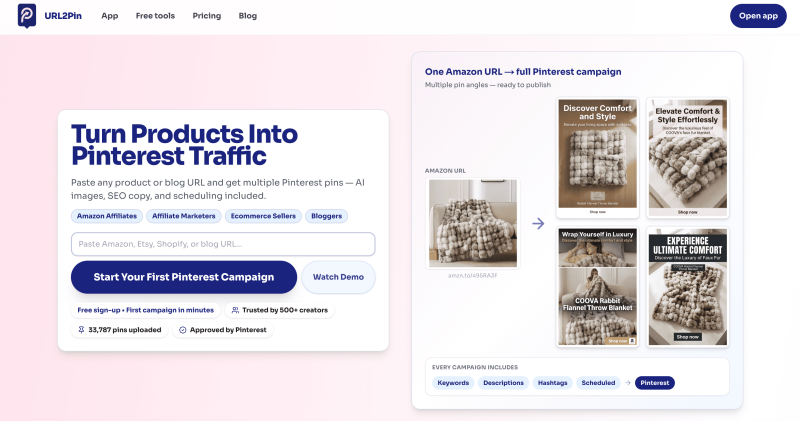
The idea is simple. Paste any product or blog URL, and URL2Pin generates multiple Pinterest pin designs, SEO-optimized titles, descriptions, hashtags, and scheduling in one place. No design skills required. The whole stack collapses into a single input field.
Built by Aristomenis, a software engineer who hit this same wall himself, URL2Pin has already helped 500+ creators publish over 33,787 pins. It works with Amazon, Etsy, Shopify, Walmart, and plain blog posts. Pinterest has officially approved it, which matters if you are serious about staying compliant.
Key Features of URL2Pin
AI Pin Image Generation
Paste your URL and URL2Pin pulls product details, then generates multiple pin images with different angles: aesthetic, gift idea, review style, and more. Each image comes sized and formatted for Pinterest. You are not tweaking templates; the AI builds fresh visuals from the product listing itself.
SEO Titles, Descriptions, and Hashtags
Every campaign includes Pinterest-ready copy. Titles are written with search intent in mind, descriptions are formatted for saves and clicks, and hashtags are grouped by relevance. This is the part that usually sends people to ChatGPT for 20 minutes. URL2Pin generates it alongside the images, in the same workflow.
Built-In Scheduling
Once your pins are generated, you can schedule them directly to Pinterest without leaving the app. No third-party scheduler needed. Paid plans include bulk scheduling, so you can batch a week of content from a handful of URLs in one sitting.
Affiliate Bridge Pages and Tag Preservation
This is the detail that separates URL2Pin from generic pin tools. Paste an Amazon affiliate link and your Associates tag stays intact through the whole process. There is also a free AI bridge page generator: paste a product URL and get a hosted url2pin.com/page/… link with a summary, pros, cons, and a buy button. Your pins then point to that page instead of straight to Amazon, which performs better on Pinterest and keeps you compliant with affiliate rules.

How Jamie Went From One Link to Ten Pins Before Lunch
Jamie runs a home decor affiliate blog and has been trying to stay consistent on Pinterest without burning her mornings on design work. At 9:15 a.m. on a Tuesday, she sat down with one task: promote a new faux fur throw blanket she had been featuring in blog roundups. Her Amazon affiliate link was ready. She had about 45 minutes before a call.
She pasted the product URL into URL2Pin, selected a few pin styles, and hit generate. Within a couple of minutes she had ten pin images, each with a different hook: one led with cozy bedroom aesthetics, another framed the blanket as a gift idea, a third used a review-style layout. Each came with a title and description already written.
She scheduled eight of them across two boards, spaced out over the following ten days. The whole process took under 20 minutes. By the end of that week, her Pinterest impressions on the blanket content had climbed noticeably, and two affiliate clicks came in before the weekend. She had done the same amount of work she used to do for a single pin, and got a full campaign out of it.

How URL2Pin Turns a URL Into a Published Campaign
Step 1: Paste Your URL
Copy any product or blog URL, including Amazon affiliate links with your Associates tag, and paste it into the URL2Pin app. The tool accepts Amazon, Etsy, Shopify, Walmart, and standard blog URLs.
Step 2: Generate Your Campaign
URL2Pin reads the page, pulls relevant details, and generates multiple pin images alongside SEO titles, descriptions, and hashtags. You can pick styles before generating to control the visual direction.
Step 3: Review and Edit
Each pin is editable before it goes anywhere. Swap copy, adjust titles, or drop a pin angle that does not fit your brand. This step takes minutes, not a design session.
Step 4: Schedule or Download
Push pins directly to Pinterest with built-in scheduling, or download the images to manage publishing yourself. Bulk scheduling is available on Creator, Pro, and Agency plans for anyone running higher volume.
URL2Pin Pricing
There is a free tier to test the workflow before spending anything. Paid plans are billed annually and break down like this:
- Starter: $9/month (up to 60 AI pins/month, scheduling included)
- Creator: $18/month (up to 150 AI pins/month, bulk scheduling)
- Pro: $41/month (up to 450 AI pins/month, most popular tier)
- Agency: $96/month (up to 1,000 AI pins/month, highest volume)
Monthly billing is also available at slightly higher rates. No contracts, cancel anytime. The free plan is enough to prove the workflow before committing to a paid tier.
Who Should Try URL2Pin
If you are an Amazon affiliate, Etsy seller, Shopify store owner, or blogger who keeps putting off Pinterest because the content work feels endless, URL2Pin is worth a serious look. The free plan costs nothing to start. Paid plans replace Canva, a scheduler, and an AI writing tool with one subscription at a lower combined price. Try it at url2pin.com and see how fast your first campaign comes together.